Last updated: October 11, 2026
Key Takeaways
- Technical SEO automation helps find, route, and sometimes fix repeatable site issues faster than manual checks.
- Automation belongs in repeatable workflow steps, not in the final decision.
- Broken pages, indexability mistakes, and sitemap drift are the first checks to automate because they are common and high impact.
- Crawl automation is often the easiest starting point for teams that need a fast, visible technical SEO system.
Quick Answer: For most sites, technical SEO automation should start with 3 core checks: status codes, sitemap health, and indexability changes.
Technical SEO Automation — The Complete Guide is about building a system that catches preventable site errors before they damage organic traffic. It suits teams that already know the basics of crawling, indexing, canonicals, redirects, and structured data, and now need a process that flags problems before revenue drops. In this guide, I use Technical SEO Automation — The Complete Guide as a practical framework for deciding what to automate, what to review by hand, and where the line belongs. I write about SEO systems and search-engine diagnostics, so I tend to judge automation by one question: does it reduce manual checking without hiding the very problems you still need a human to interpret?
What technical SEO automation is actually for
Technical SEO automation is for finding, routing, and sometimes fixing repeatable site issues faster than a human can do it by hand. It is not a replacement for judgment. It is a machine for boring, frequent checks: broken links, redirect chains, noindex tags on the wrong template, missing canonicals, sitemap drift, robots.txt changes, hreflang mismatches, schema errors, and crawl spikes. Those are the jobs that can be scheduled, compared, and alerted on.
The real value is not “doing SEO automatically.” It is building a control layer around a site that changes every day. A CMS release, a developer hotfix, a product feed update, or a migration can create hundreds of technical defects at once. A weekly crawl with Screaming Frog, Sitebulb, Lumar, or a similar crawler can catch patterns; an automated alert can catch the urgent ones in hours, not after the next monthly audit. For teams that ship often, that shorter feedback loop can matter more than the tool itself.
The best version of this setup is usually dull and disciplined. It has a crawl source, a baseline, thresholds, and a human review step. The worst version fires alerts for every small status-code wobble and trains the team to ignore them. That is the core trade-off: automation gives speed and scale, but it also multiplies noise if you do not define what matters.
This guide is for the person who owns organic performance but does not have enough engineering time to inspect the whole site manually. It is not for teams that want a “set it and forget it” SEO stack. Search systems change, templates change, and business rules change. Automation helps you keep up, but it cannot tell you whether a change is strategically wise.
Where automation belongs in a technical SEO workflow
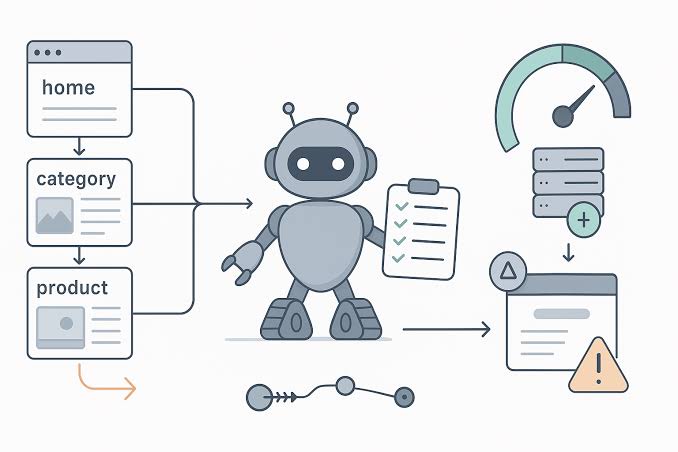
Because automation belongs in the repeatable parts of the workflow, not in the final decision, the most useful pattern is: discover, compare, alert, and then investigate. A crawler or log parser can do the first three. A person should do the fourth.
The clearest use cases are the ones that show a measurable difference from one crawl to the next:
- pages newly blocked by robots.txt
- indexable pages receiving
noindex - canonical tags pointing to the wrong URL pattern
- internal links leading to 4xx pages
- redirect chains longer than one hop
- XML sitemap URLs returning non-200 responses
- hreflang clusters missing return tags
- structured data type changes across templates
If you only automate one thing, automate change detection. A site that had 12 broken internal links last week and 212 this week needs attention; a site with a stable, known defect might not. That is why baseline comparison matters more than raw counts. The number alone is less useful than the direction and the template affected.
I would separate automation into three layers:
- Crawl automation — scheduled crawls on priority sections or the whole site.
- Signal automation — log-file monitoring, Search Console exports, uptime checks, status-code alerts, schema validation, and sitemap checks.
- Decision automation — tickets, Slack alerts, or dashboard flags that route issues to the right owner.
The limit is simple: do not automate interpretation that depends on business context. A canonical change might be correct on a localized duplicate set and wrong on a product category page. A 302 redirect might be fine for a temporary campaign and a disaster on permanent legacy URLs. Automation should surface these cases, not decide them. For that reason, the more ambiguous the rule, the more carefully it needs a human review step.
For standards and reference points, I recommend anchoring the system to Google Search Central documentation on robots.txt, sitemaps, and structured data. Those pages are not a substitute for site-specific rules, but they keep your checks aligned with the behavior Google documents. Google also explains how it handles canonicalization and page indexing, which are useful reference points when you design alert rules.
Which technical SEO problems should be automated first?
Broken pages, indexability mistakes, and sitemap drift should be automated first because they are common, high-impact, and easy to detect reliably. Those three categories usually justify the work before anything fancier like log analysis or anomaly scoring.
A practical priority order looks like this:
- Critical page health: 4xx, 5xx, accidental
noindex, blocked templates, self-referencing canonicals that disappear, and broken XML sitemaps. - Indexation control: pages that should be indexable but are excluded, rogue parameter pages, duplicate variants, pagination mistakes, and pagination canonicals gone wrong.
- Content integrity: missing title tags, duplicate H1s, missing image alt text on templates where it matters, schema drift, and hreflang errors.
- Crawl efficiency: redirect chains, loops, orphan pages, low-value duplicate URLs, faceted navigation explosions, and internal link bottlenecks.
The best automated checks are often the ones with a binary answer. A URL either returns 200 or it does not. A canonical either points to the expected pattern or it does not. A sitemap entry either resolves cleanly or it does not. As soon as a rule becomes fuzzy, false positives rise. For example, “thin content” is too vague for a clean automation rule unless you define a template-specific threshold.
The honest drawback is that first-pass automation can miss nuance. A page can return 200 and still be wrong because the wrong canonical tag is injected only on one country template. A redirect can be technically valid and still destroy internal-link equity if it sits in a long chain. A structured-data mark-up can validate cleanly and still be useless if it describes content that is not actually visible. That is why the most useful automation is template-aware, not site-wide in the abstract.
If the site is small, I would start with weekly crawls and sitemap validation. If the site is large or changes daily, I would add log-file analysis and anomaly alerts sooner. It depends on update frequency and risk. A newsroom, a marketplace, and a brochure site do not need the same level of automation. For a site with 50,000 URLs, the right setup is usually different from a site with 500, and that scale difference should shape the first rules you automate.
The honest side-by-side: crawl automation versus log-file automation
Crawl automation wins for most teams that need a fast, visible technical SEO system because it is easier to set up, easier to explain, and easier to act on. Log-file automation wins when you need to understand what search engines actually request and ignore, especially on large sites where crawl budget, parameter handling, and template bloat matter.
| Criteria | Crawl automation | Log-file automation | Winner for condition |
|---|---|---|---|
| Setup effort | Easier to begin with scheduled crawls and exports | Harder; logs need access, parsing, and cleanup | Crawl automation for small teams |
| Real search-engine behavior | Indirect; it simulates a bot | Direct; it shows bot requests | Log-file automation for crawl-budget diagnosis |
| Finding broken internal links | Very strong | Weak unless the broken URL gets requested | Crawl automation for link hygiene |
| Detecting indexation waste | Good, but inferential | Strong when paired with request data | Log-file automation for large sites |
| Speed of alerts | Fast when schedules are short | Fast once pipelines exist | Tie for mature teams |
| False positives | Moderate, especially on JS-heavy sites | Lower for request-based issues | Log-file automation |
| Visibility for non-technical stakeholders | Easier to present in dashboards | Harder to explain without context | Crawl automation |
| Maintenance burden | Moderate | High, because log formats and access can change | Crawl automation |
| Best fit | Template QA, sitemaps, canonicals, status codes | Crawl analysis, bot waste, discovery patterns | Depends on problem type |
Crawl automation is the practical starting point because it maps neatly to SEO defects people already understand. A crawler can tell you that 1,200 URLs in a category template now return 404 after a deployment. That is actionable. A log file can tell you Googlebot is still hitting a dead URL pattern after internal links were fixed, which is also actionable but harder to set up and interpret. When the team needs quick wins, that difference matters.
Its weakness is that it tells you what could be crawled, not necessarily what was. That matters on very large sites where the distinction between theoretical coverage and actual crawl behavior affects prioritization. Crawl data alone can also miss edge cases created by JavaScript rendering, cookie banners, or geofenced content variants.
I would choose crawl automation first for most in-house teams, especially if the site is under a few hundred thousand URLs and the SEO function needs clear, shareable reports. I would switch the emphasis toward logs when the site is huge, faceted, or constrained by crawl budget. If the site is tiny and changes only a few times a year, neither layer needs to be elaborate.
Why log files still matter when crawlers already exist
Log-file automation matters because it shows how bots behave on the site that exists, not the site you think exists. That distinction is the whole reason experienced technical SEOs still ask for server logs even when they already have crawler output.
A crawler can tell you a URL is broken. A log file can tell you Googlebot still spends time on it after the internal links are removed. A crawler can flag duplicate URLs. A log file can show whether search engines are wasting attention on those duplicates or mostly ignoring them. That difference changes the order of fixes.
The strongest use cases are:
- validating whether important templates are discovered often enough
- spotting crawl waste on filters, sort orders, and session URLs
- checking whether new sections are actually fetched by bots
- measuring the effect of redirects and canonical consolidation
- finding legacy URLs that still attract bot attention months later
This is the layer that generic “technical SEO automation” articles usually underplay. They talk about crawling and alerts, then skip the request data that shows whether Googlebot is actually spending time where you want it to. That omission matters on enterprise sites. A company can have perfect crawl reports and still lose performance because search engines spend too much time on low-value URL patterns. For that reason, logs are often the second system to add after crawl automation is stable.
The drawback is operational, not conceptual. Log automation usually needs engineering help, a storage plan, and a parsing routine. Depending on the server and privacy setup, the logs may be incomplete, expensive to access, or hard to standardize. If that overhead means the logs are checked once a quarter, the system is too heavy.
I would not recommend log-file automation as the first project for a five-person marketing team. I would recommend it for teams managing large catalogs, marketplaces, publisher archives, or international sites with many URL patterns. It is especially useful when a crawler repeatedly reports a problem but nobody knows whether Google is still hitting the affected URLs.
How to build an automation stack that does not drown you in alerts
A useful automation stack starts with thresholds, not tools. If you do not decide what counts as urgent, every dashboard becomes background noise within a month. The stack should have three alert levels: inform, investigate, and act now.
Here is the pattern I would use:
- Schedule a crawl baseline — weekly for stable sites, daily for high-change sites, or after every major deployment.
- Track only meaningful deltas — not every changed URL, only changes in the templates and signals that matter.
- Route by owner — SEO issues to SEO, template defects to engineering, content drift to editors, and platform errors to ops.
- Record the rule — every alert should say what threshold fired and why it matters.
- Review false positives monthly — if a rule keeps firing uselessly, either refine it or drop it.
The best automation stack usually mixes a crawler, a dashboard, an uptime tool, Search Console exports, and optional log analysis. I would keep the number of tools low enough that one person can explain the whole chain in five minutes. Tool sprawl creates blind spots. A stack with six overlapping crawlers and three alert systems looks mature and behaves messy. For many teams, simplicity is what keeps the system usable after the first month.
The trade-off is simple: more coverage usually means more maintenance. The more templates, international versions, and content types a site has, the more custom the rules become. An e-commerce site with faceted navigation needs different automation than a single-domain SaaS site with 40 core pages. There is no universal setup that stays elegant forever.
This is also where many teams make a mistake. They automate every check that a crawler can produce, then wonder why nobody reads the output. I would rather automate five high-value rules well than fifty low-value rules badly. The goal is not maximum data. The goal is fewer surprises.
When should a team automate less, not more?
A team should automate less when the site is small, the change rate is low, or the engineering cost outweighs the likely damage from missed issues. Not every site needs hourly monitoring. Some sites need a quarterly crawl and a clear release checklist.
Automation is the wrong fit when:
- the site has fewer than a few hundred pages and changes rarely
- the team cannot act on alerts within a day or two
- server access, log access, or deployment data is unavailable
- the problems are mostly strategic content issues, not technical defects
- the organization treats automation output as a scorecard rather than a decision aid
There is a hidden cost in technical SEO automation that generic guides often skip: ownership. Every automated check creates an expectation that someone will fix the thing it finds. If no one owns the issue, the alert becomes evidence of failure, not a tool. That is why alert routing matters as much as alert creation.
I would also be cautious on sites with heavy JavaScript rendering or unstable template inheritance. Automation can still help there, but the rules need tighter validation because rendered output can differ from source HTML in ways that standard crawlers miss. A positive report from a crawler is not the same as search engines seeing the same thing.
For some teams, a manual checklist on deploy is enough: status codes, canonicals, robots directives, sitemap updates, and schema validation. That is not less professional. It is simply the right amount of control for the risk level. The wrong kind of automation can slow a small team more than it helps it.
What I would automate first, second, and last
I would automate status-code monitoring first, sitemap checks second, and template-level indexability checks third. Those three catch the kinds of failures that cause the fastest damage and the least ambiguity. After that, I would add crawl comparison, internal-link monitoring, and selected log analysis.
That ordering reflects risk and setup cost. A subtle shift in crawl distribution is important, but it is usually not the first fire to put out. Structured data monitoring and hreflang checks come next if the site has those features at scale. For sites with international templates, those checks can prevent expensive cleanup later.
I would leave the most subjective rules for last:
- thin-content thresholds
- semantic duplication
- internal PageRank modeling
- content decay scoring
- automated “quality” assessments
Those can be useful, but they are the easiest to get wrong. They often generate charts that look authoritative and decisions that are not. If a rule cannot be tied to a concrete fix, it should not be treated as core automation.
This is where cost in practice matters. Not software license cost alone, but the human cost of keeping the rules current. A crawler subscription can be justified quickly on a busy site, but the surrounding workflow only pays off if someone monitors the results and updates the thresholds when templates change. Automation without maintenance becomes archived evidence. For that reason, the cheapest-looking setup is not always the cheapest to run.
The verdict: which automation approach should you choose?
Choose crawl automation if you need the fastest way to catch template defects, broken links, sitemap drift, and accidental indexability changes on a site that changes often. Choose log-file automation if your real problem is crawl waste, discovery behavior, or proving what search bots actually request on a large or complex site. Neither if the site is small, low-change, and nobody owns the fixes; in that case, a disciplined manual checklist beats a noisy system.
That is the decision I would make. Crawl automation is the better starting point for most teams because it produces clear action. Log-file automation is the better second step when the site’s scale or architecture makes crawl behavior worth studying in depth. The wrong move is trying to build both at once before the team has rules, owners, and alert thresholds. A phased rollout is usually safer and easier to defend.
Exception scenarios where the answer flips
The usual recommendation flips in four situations.
-
You run a very large marketplace or publisher archive.
Log-file automation should move earlier because crawl budget and bot attention matter more than neat crawl reports. -
Your site changes only during controlled releases.
A pre-deploy and post-deploy crawl may be enough. Daily automation can be overkill if release cadence is low and ownership is tight. -
Engineering cannot support log access.
Crawl automation wins by default. A perfect log strategy that nobody can maintain is not a strategy. -
Most performance problems are not technical.
If the site’s main issue is weak intent match, poor content structure, or lack of authority, technical automation should stay light. A 500-page crawl will not fix a bad page strategy.
What a good technical SEO automation setup looks like in practice
A good setup is boring, specific, and hard to misread. It tracks a defined set of templates, compares them to a baseline, and sends one clear ticket or alert when something crosses a threshold. It does not congratulate the team for collecting data. It flags the exact rule, the affected section, and the expected owner.
I would expect a mature setup to answer questions like these without manual digging:
- Which template started returning 404s after the release?
- Did the sitemap include URLs that no longer resolve?
- Which pages accidentally gained
noindex? - Are bot requests still going to old parameter patterns?
If your automation cannot answer those questions, it is too shallow. If it answers fifty others but not these, it is pointed at the wrong target.
There is no prize for the most elaborate stack. The best system is the one that stops preventable technical damage before rankings move. That usually means focusing on a few high-value checks, keeping the rules current, and resisting the urge to automate judgment before you have automated detection.
FAQ
How much technical SEO automation does a site really need?
A site needs enough automation to catch high-impact defects before they spread. For many sites, that means scheduled crawls, sitemap checks, and alerts for status-code or indexability changes; large sites usually need log analysis too. According to Google Search Central, sitemap and indexing signals should be maintained consistently, which makes simple monitoring worth the effort.
What is the most useful first automation rule?
The most useful first rule is usually a check for important pages that turn non-200, gain noindex, or disappear from the sitemap. Those failures are easy to detect and often the most damaging. If you want one benchmark, this is usually where teams see the clearest operational value.
Do crawlers replace manual technical SEO audits?
No. Crawlers find patterns; they do not decide whether a change is right for the business, the template, or the release. Manual review is still needed for context. Google’s own documentation on indexing and duplicate URL consolidation supports that split between detection and judgment.
Is log-file analysis worth it for smaller sites?
Usually not at the start. It becomes worth the effort when the site is large, complex, or crawl-budget sensitive enough that request behavior changes prioritization.
What is the biggest mistake teams make with automation?
They automate too many low-value checks and nobody owns the alerts. A smaller system with clear thresholds beats a larger one that gets ignored. One study from Akamai found that even small delays and inefficient site behavior can have measurable business impact, which is why focused monitoring matters more than broad but noisy coverage.
Drafted with AI; not yet reviewed by a person.