Last updated: October 11, 2026
Key Takeaways
- Daily checks should cover availability, indexability, and templates, since these change without warning.
- The stack should match site size, deploy speed, and the people who must respond.
- Set thresholds around meaningful change, and send only actionable alerts to humans.
- Start with inventory, then monitoring, then escalation.
Quick Answer: A practical automated monitoring and alerting for technical SEO issues playbook uses 3 alert levels, 4 source types, and daily checks on critical URLs. It helps teams catch crawl, indexation, and template problems before rankings slide or revenue pages disappear from search.
Automated monitoring and alerting for technical SEO issues is for teams that want to catch crawl, indexation, and template problems before rankings slide or revenue pages disappear from search. In this automated monitoring and alerting for technical SEO issues playbook, I’m going to show the approach I would use if the job were to set up alerts that are useful, not noisy, and to choose the right stack without overbuilding it.
What automated SEO monitoring should catch first

Those are the problems that create real damage fast, and they are the ones worth paging a human for.
A good monitoring system is not a crawler that runs forever in the background. It is a set of tripwires tied to the pages and signals that matter most: response codes, indexability, canonical tags, meta robots directives, XML sitemap health, structured data validity, and changes in page templates. Google’s own guidance on search indexing and robots.txt makes the priority clear: if crawlers cannot fetch, interpret, or trust a URL, nothing else matters.
The mistake I see most often is alerting on everything a crawler can see. That creates a flood of low-value emails about duplicate titles, thin pages, or harmless parameter URLs. Those matter for audits. They do not belong in your incident channel unless the pattern is sudden and widespread. A monitoring system should focus on change, not just existence.
If I had to reduce this to one rule, it would be this: alert on symptoms that can suppress indexing or traffic for a meaningful segment of the site, not on every optimization opportunity.
What should you monitor every day?
You should monitor availability, indexability, and template integrity every day, because those are the signals most likely to change without warning. A 404 on one product page is annoying; a deploy that adds noindex to every category page is a problem.
The daily watchlist should include:
- HTTP status changes on critical URL groups
noindex,nofollow, and canonical tag changes- robots.txt edits and crawl-blocking rules
- XML sitemap response codes, last-modified behavior, and page counts
- Core template elements such as title tags, H1s, canonicals, hreflang, and structured data
- Redirect chains and sudden internal 3xx growth
- Spike patterns in 4xx and 5xx responses
- Page speed regressions on templates that drive organic revenue, especially above-the-fold render issues
I would separate “critical” from “interesting.” Critical means a change that can affect indexation, crawling, or large traffic segments within hours. Interesting means a quality issue that is worth fixing, but not a same-day page. That distinction keeps alerting sane.
The cleanest setup is usually a split between synthetic checks and crawl-based checks. Synthetic checks hit known URLs every few minutes or every hour and confirm that key pages return the expected status and directives. Crawl-based checks run daily or weekly across a sample or the full site to catch broader structural drift. Search Console remains essential as the upstream source of truth for Google’s view of the site, even though its data is delayed and not suited to instant paging.
If the site is large, I would not try to monitor every URL equally. I would weight the first 100 to 1,000 most valuable URLs heavily, then sample the rest by template and folder.
Which monitoring stack fits which team?
The right stack depends on site size, deployment speed, and who has to act on the alert. A small content site can get by with Search Console, uptime monitoring, and a weekly crawler. A retail or marketplace site with frequent deploys needs template-aware checks, log analysis, and routing into the on-call system.
The comparison below is the shortest honest version I can give.
| Criteria | Lightweight stack | Full-stack stack | Winner for condition |
|---|---|---|---|
| Setup time | Fast to configure with existing tools | Slower because it needs rules, thresholds, and integrations | Small team with no engineering support |
| Noise level | Higher if you rely on generic crawl alerts | Lower if you tune by template and URL group | Site with frequent deploys |
| Coverage depth | Good for basic status and indexability checks | Better for canonical, hreflang, logs, and template drift | Large or international site |
| Best data source | Search Console, uptime checks, simple crawler | Search Console, logs, synthetic monitors, crawl diffs | Sites that need root-cause analysis |
| Alert routing | Email and Slack are usually enough | Pager, Slack, ticketing, and severity tiers | Teams with an on-call rotation |
| Cost to run in practice | Lower tool overhead, more manual review | Higher tool and maintenance load | Tight budget and modest risk |
| Best at catching | Blocked pages, 5xx spikes, accidental noindex | Sitewide regressions, deploy bugs, template changes | Change-heavy CMS or ecommerce site |
| Weak point | Misses subtle template-level failures | Can become too complex for the problem | Lean teams without technical ownership |
The honest trade-off is simple: lightweight monitoring is easier to keep alive, but it is blind to the details that matter on large sites. Full-stack monitoring is much better at catching real incidents, but only if someone owns the rules. Without ownership, it turns into an expensive dashboard cemetery.
I would choose the lightweight stack for a blog, publisher, or small B2B site with fewer than a few thousand important URLs and low deploy frequency. I would choose the full-stack approach for ecommerce, SaaS, marketplaces, and any site where a bad release can alter canonicals, hreflang, or indexability across hundreds of templates.
How do you avoid alert fatigue?
You avoid alert fatigue by setting thresholds around change, not absolute counts, and by routing only actionable alerts to humans. If the alert does not tell someone exactly what changed, where it changed, and what to do next, it is too vague to be useful.
I would build three alert levels:
- Immediate: sitewide or template-wide indexability loss, 5xx spikes, robots.txt blocking, canonical changes on core pages, sitemap disappearance.
- Same-day: broken schema on high-value templates, redirect loops, hreflang mismatches across key markets, page speed regression on revenue pages.
- Review queue: duplicate titles, stray 404s, low-level internal linking issues, orphaned URLs, and isolated metadata drift.
The reason this matters is that SEO issues rarely fail in neat categories. A deploy that changes a header component can break H1s, canonicals, and schema at once. A monitoring rule that treats each symptom separately creates five tickets when the real task is one rollback, so consult a professional before automating escalation rules in a live incident process.
I would also require alerts to include a diff. A message that says “indexability changed” is weak. A message that says “42 category URLs gained noindex after the 03:10 UTC deploy” is actionable. That detail should include the affected template, sample URLs, first seen time, and whether Googlebot has already recrawled the page, if the data exists.
One more rule: do not alert on every crawl anomaly from every bot. Validate with at least two signals before escalating if the change is not obviously severe. A crawler can be wrong; a live page plus Search Console coverage plus log data is a much stronger case.
What does a practical playbook look like?
A practical playbook starts with inventory, then monitoring, then escalation. I would not buy software before naming the pages, templates, and signals that deserve protection. That order saves money and keeps the alert model grounded in business value.
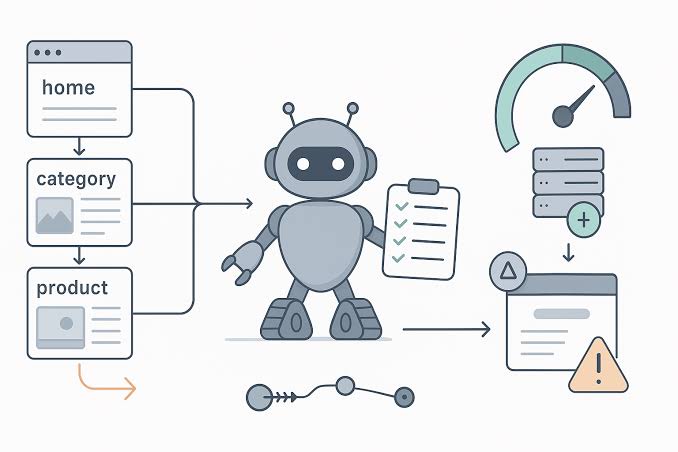
Step 1 is to define your critical URL groups. For most sites, that means home, top categories, top products or service pages, key editorial templates, and any international landing pages. Step 2 is to map the failure modes for each group: status code, robots directives, canonicals, titles, schema, hreflang, and sitemap inclusion. Step 3 is to choose the alert source for each failure mode. Some issues belong in log monitors, some in synthetic checks, some in crawler diffs, and some in Search Console reports.
Step 4 is to write thresholds that reflect real risk. A single 404 on a retired URL is not a page. Fifty 404s on URLs that still receive internal links is. A one-page canonical mismatch may be a copy error; 200 canonical mismatches after a deployment are an incident.
Step 5 is to define the response path. Every alert needs an owner, a severity, a rollback decision, and a fallback if the SEO team is offline. If the chain stops at “someone should look at this,” it is not a system. It is a notification feed.
The playbook works best when it lives next to deployment, QA, and analytics. SEO monitoring should not be a separate ritual. It should be part of release confidence, just like uptime or payments monitoring.
When does automated monitoring fail?
It fails when the site is too small to justify the machinery, when no one owns the alerts, or when the team cannot change the site quickly after the alarm. In those cases, a weekly crawl and manual Search Console review are often a better fit than a complex stack.
The clearest failure case is a low-change site with a few hundred pages and no engineering backlog. If the content changes once a month, daily synthetic checks and log alerts can become more ceremony than value. Another failure case is an organization that delegates everything to marketing but expects engineering-grade monitoring results. Without access to deploy logs, templates, or server rules, the alerting system will tell you something broke without telling you why.
I would also skip heavy automation if the site is so fragile that every false alarm creates process damage. A monitoring system has a cost even when the software itself is inexpensive: time, attention, triage, and maintenance. If the team cannot absorb that cost, keep the setup simpler.
This is where many generic guides get it wrong. They treat “more monitoring” as automatically better, but that only holds when the team can act on the signal within the same business day; if not, consult a professional about the right operating model.
Choose the simple stack or the full stack?
Choose the simple stack if your site is small, your deploys are infrequent, and you mainly need protection against obvious breakage like robots blocks, 5xx spikes, and accidental noindex tags. Choose the full stack if your site is large, multi-template, international, or released often enough that a bad deploy could affect hundreds of important URLs at once. Neither if no one owns the alerts or if the team cannot fix SEO regressions within a day.
That is the decision line I would draw. If your team needs a starting point, I would begin with Search Console, uptime checks, a crawler that can compare runs, and a clear Slack or ticket route. Then I would add logs and template-level rules only after the first alerts prove they are worth the attention.
Exception scenarios that flip the choice
The simple-versus-full-stack rule flips in a few cases.
- A small site with extreme revenue concentration. If ten URLs drive most organic revenue, even a tiny site deserves fuller monitoring on those pages.
- A large site with very stable templates. If engineering deploys are rare and controlled, a lighter stack can work longer than expected.
- A migration window. During a redesign, domain move, or URL restructuring, I would temporarily treat the site like a high-risk system and monitor far more aggressively than usual, and consult a professional before changing alert thresholds in production.
- A site with no technical owner. If alerts cannot be assigned and resolved, extra monitoring usually makes things worse, not better.
Where should the alerts come from?
They should come from the mix of sources that can explain the failure, not just report that it happened. Search Console, server logs, synthetic uptime checks, and crawl diffs each see a different part of the problem. A single source is rarely enough.
Search Console is valuable because it shows Google’s indexing view, but it is delayed. Logs are powerful because they show real bot access, but they need analysis. Synthetic checks are immediate but narrow. Crawlers are broad but can miss real-world conditions. The best playbook combines them in a coordinated way without pretending any one of them is complete.
For context, Google documents Search Console and crawl behavior in its Search Console Help and crawling and indexing documentation. Cloudflare’s Web Performance and HTTP status resources are also useful for understanding status-code driven failures, and Ahrefs’ technical SEO resources provide practical examples of common breakpoints.
FAQ
What technical SEO issues should be automated first?
Start with robots.txt changes, noindex tags, HTTP 5xx spikes, canonical changes, sitemap failures, and broken templates on your most valuable URLs. Those are the issues most likely to suppress crawling or indexing quickly.
Is Search Console enough for monitoring?
No. Search Console is essential, but it is too delayed to serve as the only alerting source. It works best as a confirmation layer, not the first alarm.
Should I alert on every crawl error?
No. Alert on crawl errors when they affect important URLs, cluster by template, or rise suddenly. Random low-volume 404s usually belong in a review queue, not an incident channel.
What is the biggest mistake teams make?
They monitor too many low-value issues and too few changes that can block indexing. That creates noise and hides the problems that actually hurt traffic.
How often should I review the rules?
Review them after every major release, after any site migration, and at least monthly for active sites. Alert systems drift fast when templates or routing rules change.
Drafted with AI; not yet reviewed by a person.